
READ WITHOUT INTERRUPTIONFrom unfamiliar text
From unfamiliar text
to clear meaning.
Select it. Read it. Keep going.
Select any area in any Windows app. Trelli recognizes the text locally and places the translation right where you need it—without copying or switching tabs.
Trelli works where the text already lives—inside articles, documents, videos, creative tools, and games.
Select it. Read it. Keep going.
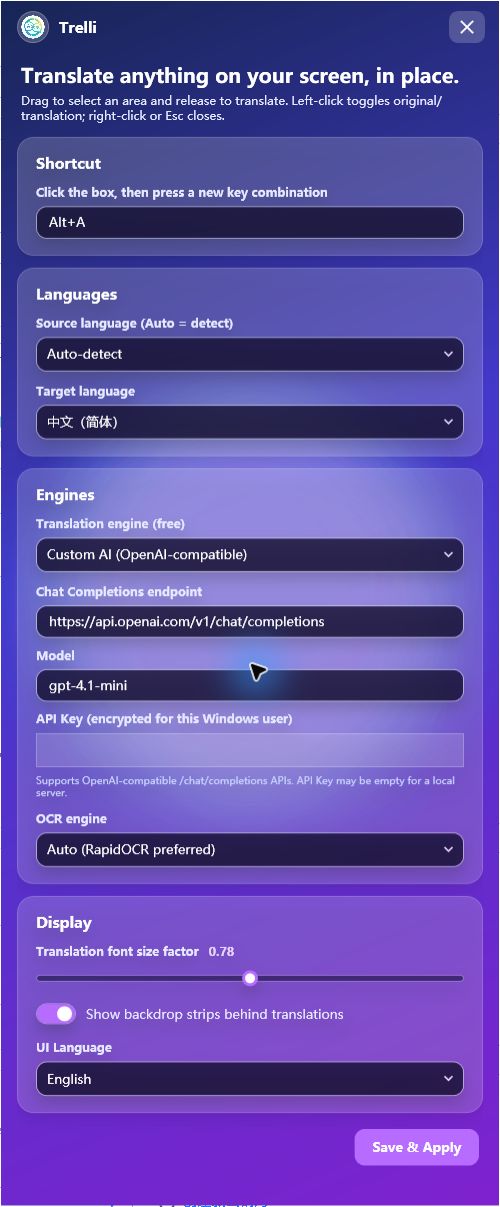
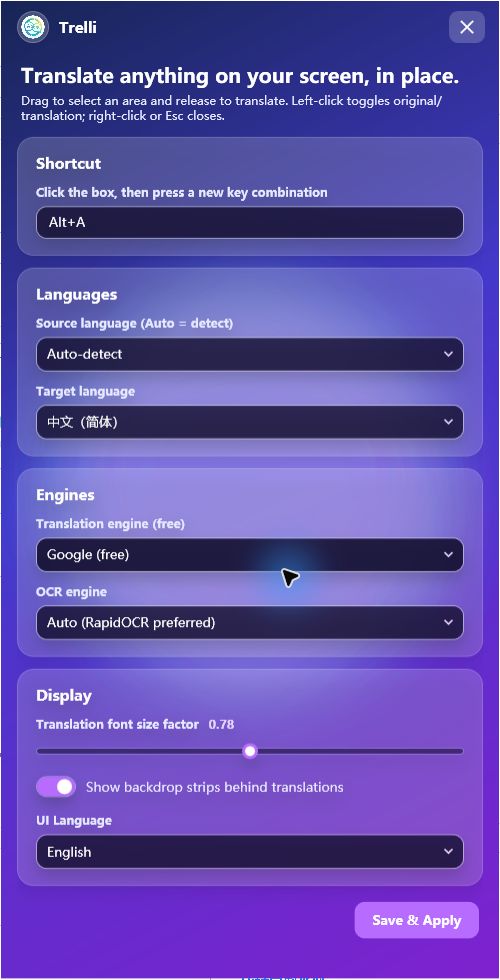
Choose your languages, OCR engine, display style, and preferred translation provider—including your own AI model.
Trelli stays out of your way until the moment you need it.
Choose a global key combination that fits the way you work.
Drag over text in a browser, PDF, video, app, or game.
The translation appears over the original layout. Click once to compare.
RapidOCR, Windows OCR, and Tesseract recognize text on your PC. Only recognized text is sent to your selected translation provider.
Layout-aware rendering keeps the translation close to the original design.
Free services can switch automatically when one is temporarily unavailable.
endpoint /chat/completionsmodel your-modelapi_key ••••••••••••Connect an OpenAI-compatible endpoint for higher-quality translation. Your key is encrypted for your Windows account.
No account inside the app. No ads. No surprise renewal.
$1.99
One-time purchase · current version
$14.99
One-time purchase · current version
No. OCR runs locally. Only recognized text is sent to the translation provider you choose.
Recognition can run locally, but translation needs internet unless you connect a compatible local AI service.
The $1.99 purchase gives permanent use of the version you buy. The update policy will be stated before launch.
No. Public sharing, resale, and redistribution require separate written permission.
Licensing, downloads, setup, or source package questions—we’re here to help.